

 By
By How to Make a Website in 2026: Step-by-Step Beginner Guide (No Coding Needed)

Introduction
Creating a website in 2026 is easier than ever. Whether you want to start a blog, build a business, or earn money online, having a website is essential.
The best part? You don’t need coding skills. With modern tools, anyone can build a professional website in just a few hours.
In this guide, you’ll learn how to make a website step-by-step, including domain, hosting, design, SEO, and monetization.
1. Choose Your Website Type (Start with a Clear Goal)

Before creating a website, decide its purpose:
- Blog website (like Aimindshub)
- Business website
- E-commerce store
- Portfolio website
👉 Choosing a niche helps you target the right audience and rank faster.
2. Pick a Domain Name (Your Website Identity)
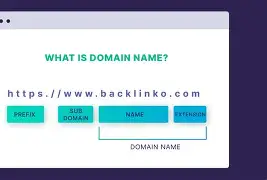
Your domain name is your website address (e.g., aimindshub.com).
Tips to Choose a Good Domain:
- Keep it short and simple
- Use keywords (AI, tech, blog)
- Avoid numbers and symbols
- Choose .com if possible
👉 Example: aimindshub.com is clean, memorable, and niche-focused.
3. Buy Web Hosting (Where Your Website Lives)
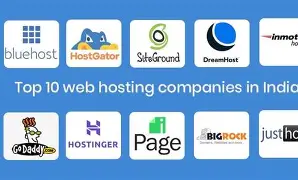
Hosting stores your website files online.
Popular Hosting Providers:
- Bluehost
- Hostinger
- SiteGround
👉 Choose fast and reliable hosting for better SEO ranking.
4. Install WordPress (Best Platform for Beginners)
WordPress powers over 40% of websites worldwide.
Why WordPress?
- Easy to use
- No coding needed
- SEO-friendly
- Thousands of themes & plugins
👉 Most hosting providers offer 1-click WordPress installation.
5. Choose a Professional Theme

A theme controls your website design.
Tips:
- Choose a fast and responsive theme
- Keep it clean and simple
- Mobile-friendly design is a must
👉 Good design improves user experience and ranking.
6. Install Essential Plugins
Plugins add features to your website.
Must-Have Plugins:
- SEO plugin (Rank Math / Yoast SEO)
- Security plugin
- Speed optimization plugin
- Backup plugin
👉 Plugins help improve performance and SEO.
7. Create Important Pages
Every website needs basic pages:
- Home
- About
- Contact
- Privacy Policy
- Blog
👉 These pages build trust and improve SEO.
8. Start Writing SEO-Optimized Content
Content is the key to ranking.
Tips for SEO Content:
- Use keywords in title and headings
- Write helpful, detailed articles
- Answer user questions
- Use images and headings
👉 Example topics:
- AI and technology
- Make money online
- Future jobs
9. Optimize Your Website for SEO (Very Important)
SEO helps your website rank on Google.
Basic SEO Tips:
- Use focus keyword in:
- Title
- First paragraph
- Headings
- Write meta description
- Use internal links
- Optimize images
👉 SEO is the main factor for traffic.
10. Make Your Website Fast and Mobile-Friendly
Google ranks fast websites higher.
Improve Speed by:
- Using lightweight themes
- Compressing images
- Using caching plugins
👉 Most users visit from mobile—ensure responsiveness.
11. Publish and Promote Your Website
After setup:
- Share on social media
- Use Pinterest and Instagram
- Join online communities
- Write regularly
👉 Consistency = growth.
12. Monetize Your Website (Earn Money)

Once you get traffic, you can earn money:
- Google AdSense
- Affiliate marketing
- Sponsored posts
- Selling products
👉 Blogging + SEO = long-term passive income.
Conclusion
Building a website in 2026 is simple, affordable, and full of opportunities. With the right steps, you can create a professional website and turn it into a source of income.
👉 Start today, stay consistent, and focus on SEO to grow faster.
1 Comment